CuePoint
Instant audio playback for live sports, broadcast, venues, houses of worship, and live productions.
CuePoint lets operators quickly trigger music, stingers, sponsor bumps, walk-up music, crowd prompts, service cues, and other audio during live productions.
It is a lightweight, Windows-based audio playback system designed for control rooms, mobile units, arenas, front-of-house positions, houses of worship, theaters, and other live-production environments where speed, clarity, and reliability matter.
CuePoint also keeps track of what was actually played during the production and can generate playback logs and PDF run reports for broadcast-style music reporting and post-show documentation.
CuePoint runs locally on the show machine with no cloud services and no internet dependency during operation.
CuePoint is available with a 30-day evaluation license, providing full functionality for real-world use in live production environments.
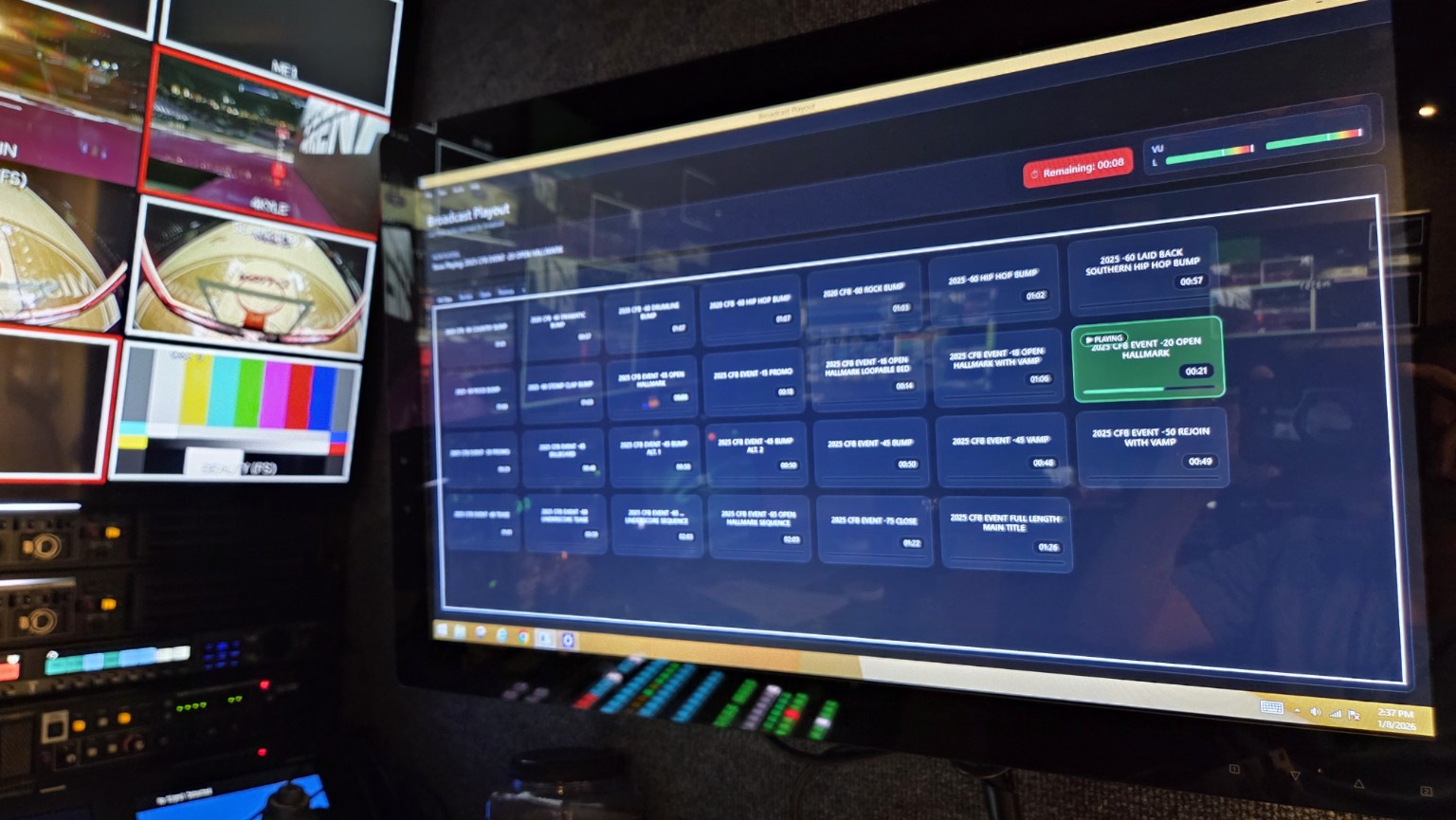

Watch CuePoint in Action
Watch a quick overview of CuePoint in a real production environment. See how operators use CuePoint to instantly trigger music, stingers, sponsor bumps, walk-up music, and other audio cues during live productions.
Questions after watching? Start a 30-day evaluation online or contact us for help with your CuePoint setup.
Typical CuePoint setups
CuePoint is designed to fit naturally into a wide range of production environments — from sports and broadcast control rooms to houses of worship, theaters, venues, and simple laptop-based live-production setups.
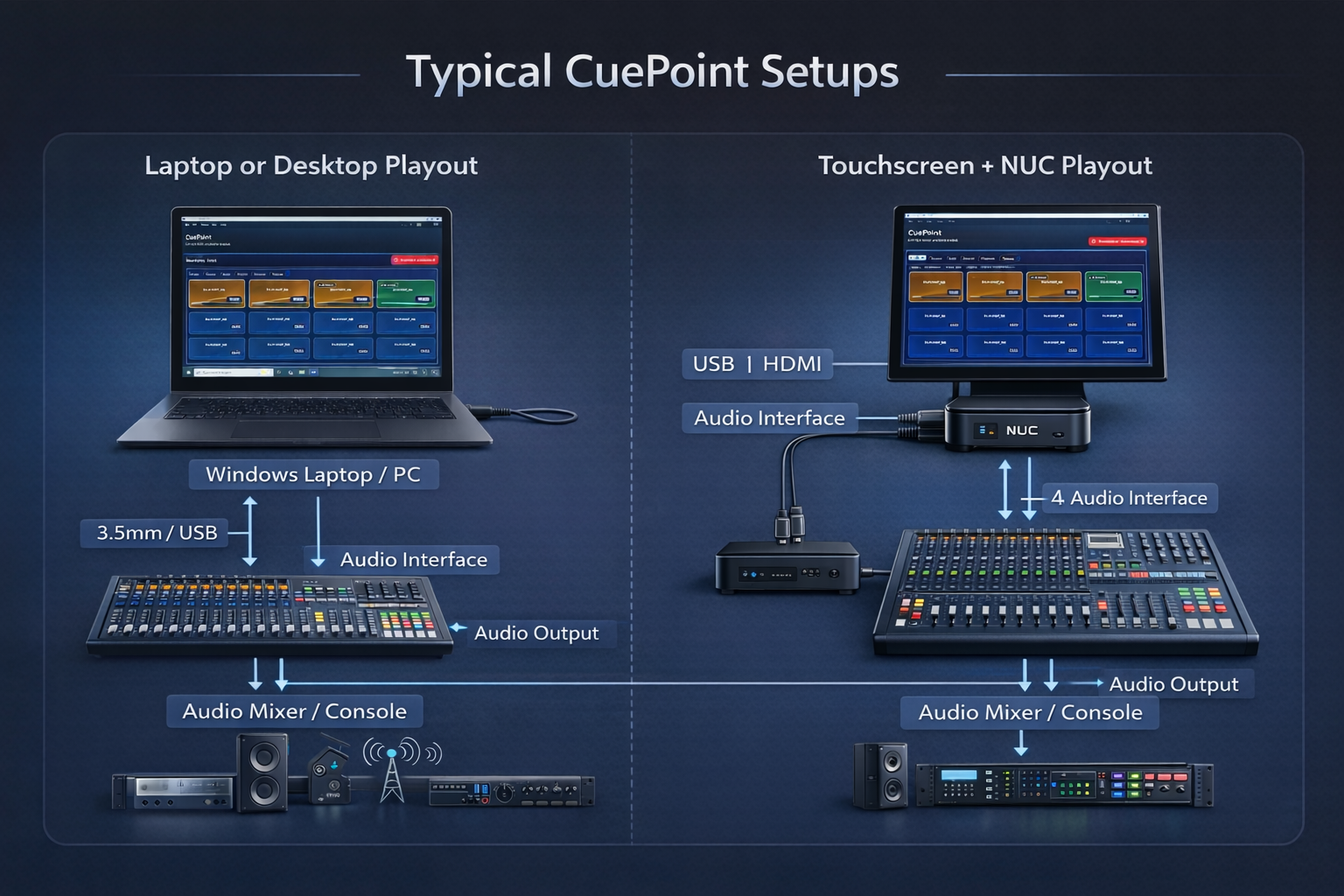
Left:
Laptop or desktop playout — ideal for mobile productions,
smaller venues, or operators already seated at a console.
Right:
Dedicated touchscreen + NUC playout — common in broadcast
control rooms and fixed installs where fast, tactile
operation is required.
Playback logging & broadcast reporting
CuePoint does more than play audio. During a production, it keeps a record of the clips that were actually played so the operator or production team can create an accurate post-show record.
Built for real broadcast music-reporting workflows
Generate readable playback logs and PDF reports with event or show information, played titles, playback durations, and other run details. The output is designed to make broadcast and ESPN-style music reporting workflows easier after the production.
CuePoint records the audio that was actually triggered during the show.
Review plays with readable durations and organized information instead of rebuilding the show from memory.
Export a clean report with optional event and show information for production records and music-reporting workflows.
CuePoint is an independent Hite Media product. References to ESPN-style reporting describe the type of broadcast workflow the reports are designed to support.
System requirements
CuePoint is designed to run reliably on modern Windows systems without requiring specialized or high-end hardware.
Minimum Works great on laptops
- Windows 10 or Windows 11 (64-bit)
- Intel Core i5 (6th gen or newer) or equivalent
- 8 GB RAM
- 256 GB SSD storage
- Integrated graphics
- Built-in audio output or USB audio interface
Recommended Dedicated playout
- Intel Core i5 / i7 or Intel NUC-class system
- 16 GB RAM
- SSD or NVMe storage
- External USB audio interface
Touchscreen Operator-first
- Windows 10 or Windows 11 (64-bit)
- Windows tablet, 2-in-1 laptop, or touchscreen display
- 13″ minimum screen size (larger recommended)
- Multi-touch capacitive touchscreen
- Intel Core i5 or better
- 8 GB RAM minimum (16 GB recommended)
Note: CuePoint requires Windows and does not run on iPadOS or Android tablets.
What CuePoint does well
CuePoint focuses on operator confidence: fast access, consistent audio levels, clear feedback, useful reporting, and reliability under pressure.
Instant tile playback
Clear visual feedback
Playback logs & PDF reports
Stand-alone reliability
Loudness normalization
Waveform-based Mark In / Out
Hotkey triggering
Session play counts
SFX and production audio
Who it’s for
- Broadcast control rooms and mobile units
- Sports venues and arenas
- College and high school athletics
- Houses of worship and church production teams
- Theaters and live performance venues
Why CuePoint exists
CuePoint was built to solve real show-day problems: inconsistent levels, slow access to audio, incomplete playback records, and overly complex systems. It prioritizes speed, predictability, and confidence when it matters most.